|
|

|
|

|
|
|
|
|
|
|
|
|
|


|
|
|
|
|
|
|


|
What's New |
|
|

| WIM 12.10, April 2026 |
|
· Minor changes to WIM, multiple updates to WAM, e.g. wam_composite_sensors, wam_npp. |
| WIM 12.09, March 2026 |
|
· Minor changes to WIM, multiple updates to WAM, e.g. wam_remap_lladir for working with ESA Sentinel-3 OLCI Water processing L2 Collection 4, wam_composite_sensors, wam_is_in_mask. |
| WIM 12.08, October 2025 |
|
· Minor changes to WIM, multiple updates to WAM, e.g. wam_l2_map (added support for SST3, SST4, PACE_OCI Chl-a data), wam_screen_mask (added support for SGLI data), wam_trend, wam_zsd and others |
| WIM 12.05, May 2025 |
|
· Minor changes to WIM, new WAM command wam_bin_chl, multiple updates to WAM, e.g. wam_histogram, wam_annual_timing, wam_remap_lladir, wam_remap2, wam_composite_last, wam_composite_sensors, wam_count, wam_trend, wam_l2_map, wam_screen_mask, wam_extract_sds and others |
| WIM 12.04, May 2024 |
|
· Minor changes to WIM, multiple updates to WAM commands, e.g. wam_composite_2x, wam_remap_and_overlay, wam_composite_month, wam_remap_lladir, wam_composite_last, wam_composite_sensors, wam_count, wam_trend, wam_l2_map, wam_screen_mask, wam_extract_sds, wam_remap2, wam_statist_sta, wam_npp |
| WIM 12.03, May 2023 |
|
· Minor changes to WIM, multiple updates to WAM commands, e.g. wam_convert_ccmp, wam_windspeed, wam_overlay, wam_match_multiband, wam_remap, wam_statist_grid |
| WIM 12.02, January 2023 |
|
· Minor changes to WIM, multiple updates to WAM commands, e.g. wam_remap_and_overlay, wam_statist_mask, wam_composite, wam_distanceToland, wam_remap, wam_statist_grid |
| WIM 12.01, June 2022 |
|
· Technically a major upgrade, switching to new libraries including .Net Framework 4.8. · Updated many WAM command line programs. |
| WIM 11.28, June 2021 |
|
· Removed inappropriate attributes from output image after Kelvin to Celsius conversion |
| WIM 11.27, May 2021 |
|
· Updated processing of OLCI L-2 files in wam_remap_lladir. · Revised saving vector objects (points and statistics) in CSV files |
| WIM 11.26, April 2021 |
|
· Updates to several WAM commands, added wam_l2_flags for extracting and remapping individual L2-flags for NASA OBPG and JAXA data formats. |
| WIM 11.25, January 2021 |
|
· Minor code revision and updates |
| WIM 11.24, November 2020 |
|
· Revised the display of extra large images (over 32000 pixels per axis). These were all black if not byte per pixel. |
|
· Updated several WAM command line programs. wam_convert_k2c was updated to extract and display sst_anomaly datasets from GHRSST Level 4 Multiscale Ultrahigh Resolution (MUR) data, e.g. https://data.nodc.noaa.gov/ghrsst/GDS2/L4/GLOB/JPL/MUR/v4.1 |
| WIM 11.22, July 2020 |
|
· Revised the reading and display of Level-2 quality flags in OLCI-A and _B and SGLI L2-products. Updated many WAM command line programs. |
| WIM 11.21, April 2020 |
|
· Added reading geo-location of SGLI 250 m data mapped around Japan in JASMES (* .nc) format. Data available at https://www.eorc.jaxa.jp/JASMES/SGLI_STD/about_sglistd.html. |
| WIM 11.20, March 2020 |
|
· Fixed an error in Linear projection crossing the Dateline. File-New in WIM can now make images crossing the Dateline. |
| WIM 11.18, December 2019 |
|
· Improved Examine-Contour Lines in WIM to make contour lines continuous. · Updated the transfer of the Grid projection vectors. |
| WIM 11.17, November 2019 |
|
· Implemented an advanced edge (front) detection algorithm -Holistically-Nested Edge Detection (HED, Xie and Tu, 2015) based on a deep neural network capable of automatically learning rich hierarchical edge maps in different image types. Updated wam_edge to include both SIED and HED methods of edge detection. HED needs additional components and is only available on request. · Added WAM programs wam_composite_points, wam_anomaly_points for comparing in situ time series with satellite means. · Updated the following WAM programs: wam_statist_mask, wam_anomaly, wam_overlay, wam_edge, wam_composite_list, wam_remap_and_overlay, wam_composite_month, wam_composite_last, wam_annual_max, wam_compsoite_sensors, wam_remap_lladir. wam_match_l2, wam_read_match, wam_ef, wam_remap, wam_npp, wam_match_nearest, rcrit. |
| WIM 11.14, March 2019 |
|
· Updated the following WAM programs: wam_screen_pf, wam_composite_month, wam_composite_2x, wam_l2_map, wam_edge, wam_edge_accumulate, wam_match_l2, wam_transform, wam_band_ratio, wam_pixelwise_match, wam_match_nearest, wam_composite_wam_screen_mask, wam_composite_sensors. Deprecated wam_composite_running which is being replaced by options in wam_composite_2x. |
| WIM 11.14, January 2019 |
|
· Updated reading of SGLI Level-2 flags in HDF5 (.h5) format, https://www.wimsoft.com/Course/2/SGLI_L2_data.pdf · Updated many WAM command line programs. |
| WIM 11.13, October 2018 |
|
· Added support for JAXA's SGLI sensor Level-2 and Level-3 (binned and mapped) data in HDF5 (.h5) format, https://www.wimsoft.com/Course/2/SGLI_L2_data.pdf · Updated many WAM command line programs, including wam_hdf5tohdf4 that converts both Level-2 and Level-3 files in h5 format to hdf4. |
| WIM 11.1, July 2018 |
|
· Added support for JAXA's new SGLI sensor (launched in December, 2017), Level-2 data in HDF5 (.h5) format, https://www.wimsoft.com/Course/2/SGLI_L2_data.pdf |
| WIM 11.0, May 2018 |
|
· Upgraded to Visual Studio 2015, linking with the latest HDF5 and netCDF4 libraries in preparation for data files from SGLI on the Japanese GCOM-C satellite. · Added wam_convert_tmi to convert binary TRMM TMI (e.g. rain) data to HDF4 format. See data description at RSS · Added wam_distanceToLand that calculates the distance to nearest nonzero pixel (e.g. land mask) using a list of points in a CSV file and a mask image in HDF4. |
| WIM 10.10, February 2018 |
|
· Updated support for OLCI 300 m (WFR) and 1000 m (WRR) data, see in OLCI_L2_data.pdf. OLCI data can be ordered from EUMETSAT. Preparations are underway for support in WIM/WAM for the advanved SGLI sensor on the recently lauched Japanese GCOM-C satellite. |
| WIM 10.09, November 2017 |
|
· Updated wam_l2_map, wam_match_l2, wam_attribute, wam_convert_cms; added wam_convert-to_float in WAM. |
| WIM 10.08, July 2017 |
|
· Updated the Edit-Draw function in WIM. |
| WIM 10.07, April 2017 |
|
· Updated WIM to use OLCI Level-2 flags. · Updated wam_remap_lladir to use Level-2 flags, etc. for processing OLCI Level 2 data. Added a tutorial for OLCI Level-2 data OLCI_L2_data.pdf |
| WIM 10.03, November 2016 |
|
· Added wam_remap_lladir to read matching OLCI Level 2 data files in matching directories, read the corrsponding geo_coordinates.nc file, map to a common projection and save as HDF4. |
| WIM 10.01, October 2016 |
|
· Update to read OLCI Level 2 data. OLCI with 300 m ground resolution and global near-daily coverage on the Sentinel-3 platform is currently the most advanced ocean color satellite sensor in operation. The sensor is still in commisioning phase and open data access is expected soon. |
| WIM 9.10, September 2016 |
|
· Minor updates |
| WIM 9.09, May 2016 |
|
· Increased the maximum number of images in an array from 256 to 1024. While this seems to be an overkill in manual WIM operations, in WAM operations arrays need to be larger. For example, when calculating annual composite using daily images and wam_composite_year, you may actually need to use up to 366 daily images. · Updated many WAM command line programs, added several new ones like wam_zeu_qaa (calculates the depth of the euphotic zone), wam_filter_valid (performs median and other filters using only valid pixels), wam_rrs_shape (shape of the Rrs spectrum. For more details see WAM.pdf |
|
· Added new command wam_convert_aquarius that converts Aquarius sea-surface salinity (SSS) data in netCDF to HDF4. 7 day SSS products of Aquarius/SAC-D are available from ftp://podaac-ftp.jpl.nasa.gov/allData/aquarius/L4/IPRC/v4/7day/
|
| WIM 9.06, February 2016 |
|
· Updated most wam programs. · Fixed problems reading projection info in subset images cut from a larger image. |
| WIM 9.04, October 2015 |
|
· In addition to the existing utility wam_composite_2sensors that is used to merge datasets from 2 sensors, we added wam_composite_sensors that merges datasets from any number of sensors. It can also change the scaling of the resulting data. · Added wam_convert_k2c that converts SST datasets in Kelvin to Celsius in the SST Pathfinder scaling. Note that there is also a Transf-Convert function in WIM to convert Kelvin to Celsius. · Added wam_fill_with that filles missing pixels with corresponding valid pixels from other datasets. · Added conversion programs wam_nc2hdf and wam_hdf2nc that convert corresponding files with multiple scientific datasets between netCDF4 and HDF4 formats. |
| WIM 9.04, September 2015 |
|
· Added a major new feature: Save as NetCDF (*.nc). While the main output format of WIM/WAM remains HDF4, the option to save as NetCDF will be important for many users. Currently this option works with Level-3 files that have not been converted to different image types. Before using this option as the main output format, check that the output confirms to what you expect. We will continue improving this feature. |
| WIM 9.02, July 2015 |
|
· Updated the color scales for NASA OBPG level-2 data |
|
· Added new tutorial for setting up multi-sensor batch processing of NASA level-2 ocean color and SST files for any area (includes mapping, compositing, merging), see http://www.wimsoft.com/Course/2/2_L2_batch_processing.pdf |
| WIM 9.01, June 2015 |
|
· Added new WAM program wam_fill_intime that reads a time series of datasets (images) and interpolates between previous and next images in time to fill in missing data pixels with linear interpolation. |
| WIM 9.01, May 2015 |
|
· Major upgrade to version 9 converts WIM/WAM from 32-bit apps to 64-bit apps.32-bit apps cannot access more memory than about 2 GB even if your PC has more. While this is usualy not a problem in manual image analysis with WIM, processing a series of large images was limited by memory. The new 64-bit memory management should be a great improvement for processing large datasets. · Added new WAM program wam_convert_k2c that converts SST datasets in Kelvin to Celsius in the convenient SST Pathfinder scaling. Note that there is also a Transf-Convert function in WIM to convert Kelvin to Celsius. |
| WIM 8.05, May 2015 |
|
· Added new function Transf-Convert type Kelvin to Celsius that converts sea-surface temperature datasets (e.g. from the GHRSST project, typically scaled 2-bytes per pixel) in degrees Kelvin to scaled byte in degrees Celsius. |
| WIM 8.04, March 2015 |
|
· Added new Projection type Grid that when the latitude and longitude vectors are provided as part of netCDF files. In the past these files were typically used as in the Global Equal Angle projection. |
| WIM 8.03, February 2015 |
|
· Fixed the capability of reading of some multi-dataset netCDF files |
| WIM 8.02, January 2015 |
|
· Fixed the display of l2-flags in the new netCDF files processed by NASA Ocean Color Processing Group (OBPG). Right-clicking shows the l2-flags for each pixel. |
| WIM 8.01, Happy New Year! January 2015 |
|
· Happy New Year and happy new WIM/WAM! Upgrading to new libraries (HDF-4.2.10 for HDF4; HDF5-1.8.13 for HDF5; netCDF-4.3.2 for netCDF)! Adding more support for the new netCDF file formats adopted by NASA Ocean Color Processing Group (OBPG). This is a major upgrade under the hood. More support for netCDF4 and HDF5 is included and more is coming! · Added wam_convert_cm that converts Surface incoming shortwave (SIS) radiation datasets from the EUMETSAT Satellite Application Facility (SAF) network Climate Monitoring (CM-SAF, http://www.cmsaf.eu) of the Metosat disk area (1983-2013) in netCDF format, adds projection and converts to HDF4 |
| WIM 7.06, June 2014 |
|
· Adding more support for the new netCDF file formats by NASA Ocean Color Processing Group (OBPG). Currently supported L3m type. · Added wam_netcdf2hdf that converts all matching netCDF files to HDF4 files. Currently OBPG files do not support internal compression and this utility can make files up to 50 times smaller. |
| WIM 7.05, June 2014 |
|
· ESA CCI program (http://www.esa-oceancolour-cci.org/ ) has released merged multisensor ocean color datasets but the L3 monthly files pack 85 datasets into a single file. It is easy to extract a dataset specified by its name or sequence number with wam_reduce_valid while reducing it X times or leaving the same size (with reduceX=1), e.g. wam_reduce_valid *.nc sdsName=chlor_a reduceX=2 extracts chlor_a and reduced it by 2 times using averaging of valid pixels. |
|
· Updated wam_match_l2, wam_pixelwise_match, wam_read_match, wam_reduce_valid. |
| WIM 7.04, May 2014 |
|
· In response to the pending transition by NASA Ocean Color Processing Group from HDF4 file format to netCDF format, WAM programs are being upgraded to be able to process netCDF files. The list is gowing and currently includes the following: wam_series, wam_statist, wam_composite_2x, wam_composite_month, wam_reduce_valid. |
|
· Updated wam_convert_aviso_sla, wam_edge_accumulate, wam_match_l2, wam_read_match, wam_pca, wam_rgb_modis. |
| WIM 7.04, March 2014 |
|
· Added wam_contours that creates images of isoline contours. |
|
· Updated wam_overlay that can now be used to make overlays from 2 sets of images by matching pairs based on their timing. |
| WIM 7.04, February 2014 |
|
· Added support for the ESA Ocean Colour Climat Change Initiative products comprising merged and bias corrected MERIS, MODIS and SeaWiFS data in the Geographical projection. Support for the 4-km equal area data in Sinusoidal projection will be added later. Daily datasets can be downloaded from PML at: ftp://oc-cci-data:ELaiWai8ae@oceancolour.org/occci-v1.0. |
|
· Updated wam_match, wam_read_match, wam_match_nearest, wam_match_l2. |
| WIM 7.03, January 2014 |
| · Added WAM command wam_read_match for plotting and statistics calculations of matchup files created with wam_match_l2 and wam_match_nearest. |
| WIM 7.03, August 2013 |
| · Added the automated level-2 data downloader and automated data processing scripts, see http://www.wimsoft.com/Course/2/DataSubscriptionProcessing.pdf |
|
WIM 7.03, June 2013 |
|
· Updated WIM to read netCDF files from Multi-scale Ultra-high Resolution (MUR) SST analysis http://coastwatch.pfeg.noaa.gov/erddap/griddap/jplMURSST.html . These SST datasets are global, have high resolution (0.011 degrees), daily and have no missing data due to clouds! Select your range of Lat and Lon, pick only 1 daily dataset at a time for downloading, select .nc - NetCDF-3 file for downloading. After downloading you may want to convert to 1 byte per pixel with SST-PATHF scaling for better visualization. |
|
WIM 7.02, June 2013 |
|
· Updated WAM commands, e.g. wam_kmcluster, wam_pixelwise_match, wam_pixelwise_match_add, wam_mathc_multiband, wam_match_nearest, wam_composite_month. |
|
WIM 7.01, February 2013 |
|
|
WIM 7.01, January 2013 |
|
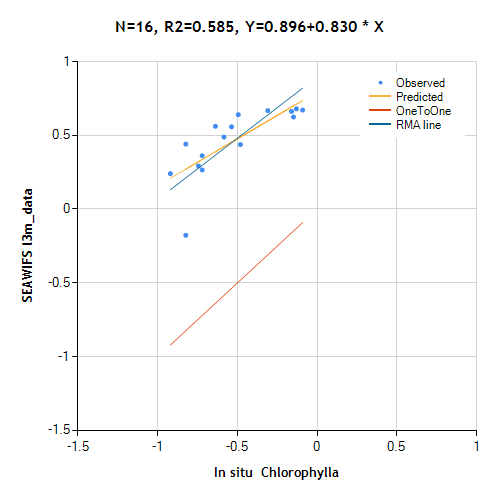
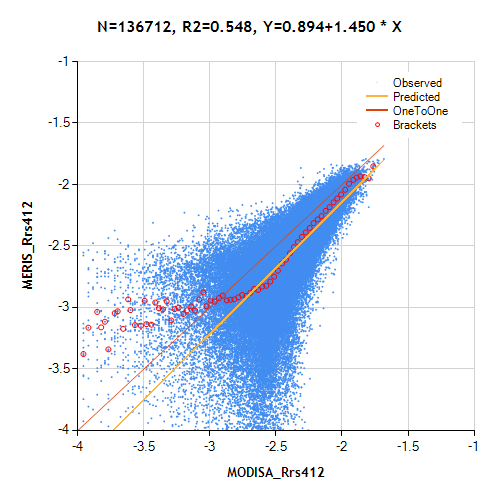
· Added wam_convert_iceage that converts maps of first-year and multi-year sea-ice created by Dr. D. Long using QuikSCAT SeaWinds and available from ftp://podaac.jpl.nasa.gov/allData/quikscat/preview/L3/byu_scp/sea_ice_age/arctic/ to more compact form of HDF4. · Added a pair of new commands wam_pixelwise_match and wam_pixelwise_match_add that are used to create and display scatter plots of match-ups between different satellite products. More info will be in WAM.pdf, a reduced sample scatter plot of MERIS Rrs412 versus MODISA Rrs412 is shown below.
|
|
WIM 7.00, January 2013 |
|
· This is a major update under the hood. On the surface the major change is the addition of the support for reading netCDF files. Previous versions of WIM/WAM could read old (version 2) netCDF files as HDF files but not the later version 3 and 4. NetCDF version 4 has become the de facto standard of satellite data and most data centers are switching to netCDFv4 as the main data format. Many current datasets are only available in netCDFv4. WIM can directly read netCDF4 files and we will gradually update all WAM commands to read directly netCDFv4 files as well. Currently the following WAM programs/commands can read netCDFv4 datasets: wam_series, wam_statist, wam_remap2, wam_anomaly. The preferred format for WIM/WAM is still HDF4 and it is often more convenient to convert datasets in other formats to HDF4. |
|
WIM 6.66, October 2012 |
|
· Added a new command wam_shape that evaluates the shapes of time series for each pixel of a series of images and finds the best matching shape using RMS differences. |
|
· Added a new utility MakeCircles useful when creating masks for wam_statist. Using a list of points specified by the center longitude and latitude, MakeCircles draws circles for each with a given radius in km. These circles can then be edited with Edit-Draw to create mask images for wam_statist. |
|
WIM 6.66, September 2012 |
|
· Modified the default color setup (Color Scaling Min and Max) for wind data available from ftp://podaac.jpl.nasa.gov/OceanWinds/ccmp/L3.5a. The *.nc files are converted to HDF4 with wam_convert_ccmp. The individual datasets, e.g. wind speed (WSPD), can be extracted with wam_series. |
|
WIM 6.65, August 2012 |
|
· Added wam_convert_ncsst that converts global 6-km SST data from GHRSST netCDF files into HDF4 files. A major problem with infrared satellite data is that in cloudy conditions there are no data. The OSTIA Sea Surface Temperature and Sea Ice Analysis merges data from multiple sensors to provide SST data even through clouds.The 6-km global data are provided by the UK Met Office and can be downloaded from ftp://podaac-ftp.jpl.nasa.gov/allData/ghrsst/data/L4/GLOB/UKMO/OSTIA/ |
|
WIM 6.65, July 2012 |
|
· Updated WAM tools (e.g. wam_l2_map) for processing VIIRS Level-2 data. See more on Level-2 data processing here. VIIRS data granules are much smaller than those of MODIS and therefore manual processing is inconvenient. Tools like wam_l2_map merge data from individual granules (separate files) into a single daily mapped composite. · Updated wam_l2_map for the changes in MODIS Terra and Aqua Level-2 SST file format that has new datasets bias_sst, stdv_sst and sstref. · Added tools to automate the creation of RGB images using MODIS L1B data (including 250 m resolution). Executable makelistcrefl creates the control files and the provided batch file rgb_modis_all.bat automates the whole process. More details here. |
|
WIM 6.65, June 2012 |
|
· Added wam_rrs_l2 that applies various algorithms to Rrs bands in Level-2 ocean color files. For example, the standard chlor_a product is calculated with OC4v4 for SeaWiFS and OC3v6 for MODIS. With wam_rrs_l2 you can calculate Chla and (soon) other variables with a number of different algorithms. |
|
WIM 6.65, February 2012 |
|
· Added LOG-MINUS4 to Value Scaling and Transf-Convert options in WIM to simplify conversion to scaled byte of images with values from 0.0001 to 0.668 such as natural fluorescence line height (nflh), Rrs and others. · Updated wam_l2_map that remaps and composites Level-2 files into daily mapped composites. In addition to Chl and SST it now works with many other variables like the natural fluorescence line height (nflh), Rrs and others. |
|
WIM 6.64, February 2012 |
|
· Updated wam_qaa_l2 and wam_qaa_l3 that apply the QAA vers. 5 bio-optical algorithm (Lee et al.) to multiple sensors (SeaWiFS, MODIS, MERIS) and calculate spectral absorption, backscatter and Chl-a (from aph440) · Added a new absorption-based production algorithm (Aph-PP) of Lee et al (2011) wam_npp_lee that calculates water column integrated primary production using output from the QAA bio-optical algorithm (wam_qaa_l2 and wam_qaa_l3) · Added a new compositing algorithm wam_composite_month2 that makes monthly composites and is similar to wam_composite_month but works with very large images. · Updated wam_screen_pf that now screens NOAA Pathfinder 5.2 files and selects the highest quality sea_surface_temperature data. · Added a simple utility wam_show_time that shows the detected start and end times of a set of HDF4 files. · Added a utility SDSExtract that reads netCDF4 files (e.g. AVHRR Pathfinder v 5.2 files), and extracts a set of selected datasets into HDF4 files. |
|
WIM 6.63, December 2011 |
|
· Updated wam_qaa_l2 and wam_qaa_l3 that apply the QAA vers. 5 bio-optical algorithm (Lee et al.) to NASA Level-2 and Level-3 ocean color Rrs datasets and calculate spectral absorption, backscatter and Chl-a (from aph440). · Updated wam_count that can now be used to create time series of areas with values below or above a threshold, e.g. areas with SST above 30 C or Chl-a below 0.1. · Updated wam_match_nearest to find concurrent match-ups to in situ data from multiple datasets in the same HDF4 file, e.g. those in QAA files. · Updated wam_series to easier extract image subsets by either lat/lon or x/y. · Updated wam_composite_month to be able to select individual variables to be composited from HDF4 files containing multiple datasets. · Updated wam_npp_point. |
|
WIM 6.63, November 2011 |
|
· Updated WIM to use the attributes of “Suggested Image Scaling Minimum” and “Suggested Image Scaling Maximum” in NASA OBPG files to set the Color Scaling Min and Max values of Float32 images, e.g. for the natural fluorescence it sets Min=0.0 and Max=0.05. |
|
WIM 6.62, October 2011 |
|
· Updated most WAM commands wam_correlation, wam_disassemble, wam_match_nearest, wam_trend, wam_anomaly, wam_annual_max, wam_match_l2, wam_proj_lin, wam_edge, wam_composite_2sensors, wam_composite_month, wam_band_ratio, wam_turbidity, wam_turbidity_aster, wam_l2_map, wam_composite_2x, wam_composite_last. · Modified command wam_l2_map for SST data by making the default quality level back to 1 as quality level 2 includes lots of suspect data. · Modified GUI program wam_match by changing the graphic libraries. More updates are needed for this program. |
|
WIM 6.62, May 2011 |
|
· Enhanced commands wam_correlation, wam_correlation_series, wam_trend by adding options to screen (make zero) values that are below specified significance level. · Modified command wam_l2_map for SST data by making the default quality level 2 that produces better coverage without sacrificing in quality. SST fronts have often quality 2 that would eliminate those pixels. · Modified commands wam_composite_2sensors, wam_remap_and_overlay, wam_statist_sta, wam_edge, wam_edge_accumulate, wam_reduce_valid, wam_composite_month. |
|
WIM 6.62, February 2011 |
|
· Added WAM commands wam_histogram that calculates histograms of pixel values of a set of HDF files and wam_proj_linear that sets the projection to Linear with specified coefficients for all matching images in HDF files. |
|
WIM 6.62, January 2011 |
|
· Modified WAM command wam_l2_map by adding the option to map and create daily composites of variables other than SST and Chl by using the var=VARIABLE option, e.g. var=kd_490. The scaling of all variables other than SST, Chl and Kd_490 is Float32.The dependant WAM commands wam_composite_2sensors, wam_composite_2x and wam_composite_month were also modified. |
|
WIM 6.61, October 2010 |
|
· Added WAM command wam_lin_transform that performs linear transforms like Y = A * X + B on a series of matching HDF files. · Modified WAM command wam_match_l2 that finds closest match-ups for a list of stations and a series of Level-2 ocean color files. The l2_flags are considered for finding valid match-ups. In addition to the standard chlor_a, algal-1 and algal_2 variables, various other algorithms can be applied to the Rrs or nLw data to find match-ups. |
|
WIM 6.61, September 2010 |
|
· Added WAM command wam_convert_ascat that converts datasets of ASCAT in netCDF to HDF, transforms Latitude and Longitude from Int32 format to Float32. ASCAT is a scatterometer that provides Level-2 ocean wind products; data are available at http://podaac.jpl.nasa.gov/DATA_CATALOG/ascatinfo.html. Gridded (Level-3) wind data are easier to use and are available from the CCMP project at ftp://podaac.jpl.nasa.gov/ocean_wind/ccmp/L3.5a/data/, and can be converted to HDF with WAM command wam_convert_ccmp. · Added WAM command wam_replace_values that replaces a range of pixel values with a new value in a set of HDF files. |
|
WIM 6.61, August 2010 |
|
· Modified WAM command wam_match_l2 that finds satellite match-ups of chlor_a to selected list of positions and date/time to read standard Reprocessing 2009.x Level-2 files that contain Rrs (remote sensing reflectance) instead of nLw (normalized water leaving radiance). Instead of the standard chlor_a and l2_flags it allows using other Chl algorithms to find match-up statistics. |
|
WIM 6.61, July 2010 |
|
·
Added WAM command
wam_convert_oisst
that converts daily binary files of OI (Optimum Interpolation) SST datasets
available at
ftp://eclipse.ncdc.noaa.gov/pub/OI-daily-v2/IEEE/
to HDF4 files with added attributes, scaling and projection. The AMSR-E/AVHRR
dataset merges SST data from both infrared and microwave sensors and removes
the bias. See Reynolds et. al 2006: Daily High-resolution
Blended Analyses. |
|
WIM 6.60, May 2010 |
|
· Added a new WAM command wam_annual_timing that finds annual time series of the number of days with pixel values above or below a certain threshold as well as the annual first and last days above or below a threshold. For example, you can calculate the length of ice period, the start and end of ice period, the length, start and end days of high/low SST or Chl-a, etc. |
|
WIM 6.60, May 2010 |
|
· Added new HDF file types corresponding to various product types generated by the NASA reprocessing R2009.1 of ocean color data. · Modified WAM command wam_annual_max by adding flexibility to select the reduction factor. |
|
WIM 6.59, May 2010 |
|
· Added WAM command wam_convert_ssmi that converts raster binary files of ice concentration distributed by NSIDC ftp://sidads.colorado.edu/pub/DATASETS/seaice/polar-stereo/nasateam/ to HDF files with added attributes, scaling and projection. Ice concentration is represented as fraction of ice with a valid range of 0.0-1.0. · Added WAM command wam_trend that calculates pixel-wise slopes (trends) using the nonparametric Sen slope or the Linear regression slope and the statistical significance at various levels (90%, 95%, 99%). |
|
WIM 6.59, April 2010 |
|
· Modified WAM commands wam_l2_map, wam_composite_2x, wam_composite_month to work with MERIS RR 1-km L2 files downloadable from http://merci-srv.eo.esa.int/merci/welcome.do. Currently only algal_1 and algal_2 datasets can be processed. The MERIS N1 files have to be converted first with wam_convert_n1. · Added a new WAM command wam_compare_2sets that creates ratio anomalies from 2 sets of HDF files, e.g. SeaWiFS and Aqua or Aqua and MERIS chlorophylls. The command finds all pairs that match in timing and saves their ratios. |
|
WIM 6.59, February 2010 |
|
· Both WIM and WAM are now working in 64-bit Windows! WIM has always worked in 64-bit Windows but WAM did not. New linker options fixed the problem. Please note that the Wimsoft folder will be installed in the Program Files (x86) folder (instead of Program Files folder) and therefore the default locations of sample files have changed and the command examples in the manuals may also need to be modified. · Minor changes in the color scaling of certain HDF files. |
|
WIM 6.58, January 2010 |
|
· Added a new command wam_binarize that finds all pixels larger or smaller than a Limit, saves the images as HDF and PNG, and a CSV file with the count per image.
·
Added a new command
wam_convert_n1
that converts MERIS Level-2 data into HDF4 format suitable for processing with other WIM/WAM modules. MERIS Level-2 RR data can be ordered
at http://merci-srv.eo.esa.int/merci/welcome.do
(login and password are needed).
For example, a command like wam_convert_n1 *.N1 algal_1 |
|
WIM 6.58, December
2009 |
|
· In response to the large size of the standard MERIS L2 files produced by NASA, added a command that extracts selected datasets (e.g. chlor_a, l2_flags) and saves in a compressed HDF file. · Added new WAM commands for processing wind data downloadable from ftp://podaac.jpl.nasa.gov/ocean_wind/ccmp/L3.5a/data/flk/. wam_convert_ccmp converts monthly and 5-day Cross-Calibrated Multi-Platform (CCMP) Ocean Surface Wind Components (Atlas et al. 2008, 2009) data in NetCDF to HDF, adds scaling and geo-location information and reduces the file size while preserving the accuracy. wam_convert_to_power - calculates the power of an image, e.g. square or cube. wam_gradient - calculates vertical or horizontal gradients. E.g., when applied to wind stress data, this can be interpreted as wind meridional or zonal wind stress divergence. wam_anomaly -updated for dealing with the CCMP wind data.
|
|
WIM 6.58, September
2009 |
|
·
In response to the current reprocessing
(designated SR2009) by
the
NASA Ocean Biology Processing Group
of all ocean color products ( see
http://oceancolor.gsfc.nasa.gov/REPROCESSING/R2009/
) · Added new WAM utilities: wam_integrate (integrates a set of images to produce total integrated values, e.g. global primary production in gigatons of carbon); wam_composite_pairs (makes pair-wise composites using a list) · Need to update some WAM utilities that use normalized water-leaving radiances (nLw) as the standard ocean color L2 files will now have remote sensing radiances (Rrs) instead of nLw; also MODIS band 551 nm has been renamed to 547 nm band. Therefore, WAM programs looking for the 551 nm band need to be modified. |
|
WIM 6.57, July
2009 |
|
· Updated the Examine - Peeker function to use different format depending on image type. · Added new WAM application wam_convert_ccmp that converts all matching Cross-Calibrated Multi-Platform (CCMP) ocean surface wind Level 3.5a netCDF files into HDF, adding projection info and other attributes. CCMP data are multi-satellite products of ocean surface winds that span nearly 21 years and are derived through cross-calibration and assimilation of ocean surface wind data from SSM/I, TMI, AMSR-E, SeaWinds on QuikSCAT, and SeaWinds on ADEOS-II. CCMP wind data can be downloaded from ftp://podaac.jpl.nasa.gov/ocean_wind/ccmp/L3.5a/data/. · Added new WAM application wam_screen_mask that examines standard Level-2 ocean color files and removes those that have no valid data inside specified area of interest. · Updated WAM applications wam_correlation and wam_correlation_series that calculate pixel-wise correlation images between a 1-dimensional time series (e.g. an El Nino time series) or 2 sets of images (e.g. Chl and wind speed anomalies). |
|
WIM 6.56, June
2009 |
|
· Updated the WIM Linear projection to work over the antimeridian (i.e. 180° longitude). Formerly it was difficult to create mapped images extending over the antimeridian, e.g. of the Bering Sea. |
|
WIM 6.55, January
2009 |
|
· Minor updates to WIM · Added wam_convert_meris that converts MERIS Level-2 DIM files to HDF4 with attached longitude and latitude arrays for geo-location in WIM and WAM · Added wam_uncompress_hdf that uncompresses datasets (SDS) within HDF4 files · Added wam_mozaic_land_ocean that makes a mosaic from two RGB images based on the pixel value of a mask image · Added wam_match_l2 that finds match-ups from various ocean color Level-2 images based on a list of points with lon, lat, date, time. Finds statistics and extracts chlor_a, l2_flags and calculated Chl-a based on several algorithms. · Added wam_match_multiband that finds match-ups from various ocean color Level-3 nLw datasets based on a list of points with lon, lat, date, time. Finds statistics of Chl-a calculated with several algorithms. · Updated wam_band_ratio that calculates Chl-a and CDOM from Level-3 datasets of various nLw. |
|
WIM 6.54, October
2008 |
|
· Added automatic projection detection for GlobColour 1 km Equirectangular datasets available by subscription from ACRI http://hermes.acri.fr |
|
WIM 6.53, September
2008 |
|
· Added a new program wam_convert_ssmibin that converts raster binary files of ice concentration distributed by NSIDC ftp://sidads.colorado.edu/pub/DATASETS/seaice/polar-stereo/nasateam/ to HDF files with added attributes, scaling and projection. Ice concentration is represented as fraction of ice with a valid range of 0.0-1.0. |
|
WIM 6.53, August
2008 |
|
· Updated wam_statist and wam_match by adding an option to pick the separator in the CSV output file. Previously the output CSV file had its columns separated by a comma that created a problem in European setups where comma is interpreted as a decimal comma instead of a decimal point. The separator can now be either comma, tab or space. Also, wam_statist and wam_match can now be run at low screen resolution. |
|
WIM 6.53, July
2008 |
|
· Added a new standard projection, Global ISIN. It is the sinusoidal equal-area grid on which the MERIS Level-3 data are presented. The average size of the grid bins is equal to 1/12° (or about 9.277 km) leading to 2160 rows and 4320 columns just below and above the equator (details here). · Added new tutorial Validation of satellite data with WIM/WAM, http://www.wimsoft.com/Tutorial_Validation.pdf |
|
WIM 6.52, June
2008 |
|
· Added functions for reading and displaying MERIS Level-3 data in netCDF format downloadable from http://envisat.esa.int/level3/meris/. Remember to use the netCDF (*.nc) and not the HDF format data. See paragraph 21 MERIS Level-3 Products in the WIM User's Manual WIM.pdf for more information. The .nc.gz files have to be uncompressed, e.g. with a command like gzip -d *.nc.gz , before using in WIM. |
|
WIM 6.51, May
2008 |
|
· Added new tutorial Estimating Primary Productivity with WIM/WAM, http://www.wimsoft.com/Tutorial_Primary_Productivity.pdf · Multiple minor code fixes and improvements, changes in the WAM program suite |
|
WIM 6.50, April
2008 |
|
· Added new Tutorial on Detection of Change with WIM/WAM (http://www.wimsoft.com/Tutorial_Detection_of_Change.pdf) |
|
WIM 6.50, March
2008 |
|
· Switched the code to Visual Studio 2008. While this should be transparent to the user, we have improved the functionality of some parts: improved the speed, increased the use of multiple cores (if present in your computer), fixed some bugs. · Added new Tutorial on Variance and Anomaly Analysis with WIM/WAM (http://www.wimsoft.com/Tutorial_Variance_Anomalies.pdf) · Added new WAM programs wam_annual_max, wam_max_trend. Tutorials how to use them will be added soon. |
|
WIM 6.50, February
2008 |
|
· Added functions dealing with GOES 11-12 daily (24 hour) SST data. See ftp://podaac.jpl.nasa.gov/sea_surface_temperature/goes/goes11-12/ for data and documentation. wam_convert_goes1112 reads GOES SST and cloud probability data in binary raster format with a header, converts to HDF and adds attributes for navigation, scaling and time series analysis. wam_screen_goes1112 screens SST data according to cloud probability, i.e. keeps only those SST pixels with cloud probability below certain cloud probability. · Added wam_match_nearest, a utility that reads a list of stations specified by Longitude, Latitude, Date and Time, finds the nearest matching satellite images with valid data and calculates statistics of the satellite data for each station. |
|
WIM 6.50, January
2008 |
|
· Added functions to deal with GlobColour binned and mapped files. GlobColour is an ESA project (http://www.globcolour.info) that produces global and local ocean color datasets from individual sensors or merged from multiple sensors. Section 20 in WIM manual Wim.pdf has examples on using GlobColour global (FPS = Full Product Set) data that can be downloaded from (http://www.globcolour.info/data_access_full_prod_set.html. Local datasets (DDS) for many “diagnostic” data sites are available from http://www.globcolour.info/data_access_dds_list2.html. · Added a new WAM program wam_count that calculates a time series of the number of pixels with values either above or below a certain threshold. The time series can be produced for either whole images or for up to 255 specified areas of interest (masks). |
|
WIM 6.49, November
2007 |
|
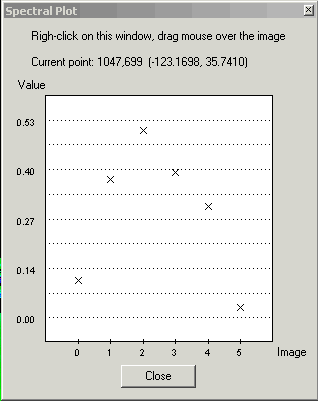
· Added a new function Examine-Spectral Plot that interactively plots pixel values from multiple images versus image number. If the images represent multiple (co-located) spectral bands then the plot is a true “spectral plot”. The example below shows normalized water-leaving radiances read from a MODIS Level-2 file.
· Added new WAM programs wam_composite_running that produces running composites over a period of any number of days and wam_composite_year that produces yearly composites. |
|
WIM 6.48, October
2007 |
|
· Revised the mapping algorithm used in the Latitude-Longitude Array (LLA) projection type. · Revised the WAM programs calculating Net Primary Production (NPP) using the VGPM algorithm. Added wam_npp for easy calculation of NPP images based on various Chl, PAR and SST data, wam_npp_point for calculating NPP statistics for a list of stations using sets of satellite images. |
|
WIM 6.47, August
2007 |
|
|
WIM 6.46, June 2007 |
|
· Added two new functions File – Save as - Google Earth KML (*.kml) and Save as – Google Earth KMZ (*.kmz). Both options save the current image in a format that is suitable for later viewing in Google Earth. · Enhanced the Geo – Get Vector Objects function ( in the toolbar). WIM can now read the ESRI shapefiles (http://www.esri.com/library/whitepapers/pdfs/shapefile.pdf) as other vector objects. Currently the shape objects are written into the image or into the bitmap but they don’t get into the Vector Objects table. A sample shapefile (USstates.shp) with US state boundaries is installed in the Maps folder. |
|
WIM 6.45, May 2007 |
|
· Added a new function Geo-View in Google Earth ( in the toolbar) that opens Google Earth (must be installed, see http://www.earth.google.com) and displays the image. · Enhanced the File - New function (in the toolbar). You can now specify either the image size in pixels or the approximate pixel size in meters. Also, you can choose to automatically display coastlines on the new image. · When saving HDF-EOS files in Geographic projection (e.g. navigated ASTER Swath files), the image is now converted to regular HDF and the projection to WIM Linear projection. That is required in order to save multiple images or a RGB image in a single file (see Exercises_ASTER.pdf). |
|
WIM 6.44, April 2007 |
|
· Added a new function Geo-View in Google Maps (in the toolbar) that opens a new window and displays the image boundaries in Google Maps (see http://www.google.com/maps) with a wealth of geographical information. · Fixed the problem with saving very large JPEG, PNG and GIF files. |
|
WIM 6.43, April 2007 |
|
· Most new PCs have either multiple cores or CPUs. The rather slow operation of remapping (Geo–Remap Projection) is now multi-threaded, taking advantage of multi-core and multi-processor PCs. It is now approximately 2 times faster on dual-core CPUs and 4 times faster on 4-core CPUs. The progress bar is also in a separate thread but that is not so obvious to the user. |
|
WIM 6.42, March 2007 |
|
· Added a new version of Edit-Draw operations for RGB images. If the background image is a RGB image then you can edit the image with a set of 3 values (for each of the Red, Green and Blue components). You can convert an image to RGB image with Transf – Convert to 24bbp (RGB). The color selection is done with new dialogs. |
|
WIM 6.41, February 2007 |
|
· Added the long-awaited Undo operation to Edit-Draw. The stack of operations in memory is 16 steps long and you can moved back and forth in the stack using the icons on the Toolbar. |
|
WIM 6.40, January 2007 |
|
|
WIM 6.39, October 2006 |
|
|
WIM 6.38, September 2006 |
|
|
WIM 6.37, September 2006 |
|
|
WIM 6.36, May 2006 |
|
|
WIM 6.35, April 2006 |
|
|
WIM 6.34, March 2006 |
|
|
WIM 6.33, December 2005 |
|
|
WIM 6.32, November 2005 |
|
|
WIM 6.31, October 2005 |
|
|
WIM 6.30, May 2005 |
|
|
WIM 6.29, February 2005 |
|
|
WIM 6.28, December 2004 |
|
|
WIM 6.27, November 2004 |
|
|
WIM 6.26, September 2004 |
|
|
WIM 6.25, August 2004 |
|
|
WIM 6.24, July 2004 |
|
|
WIM 6.23, June 2004 |
|
|
WIM 6.22, May 2004 |
|
|
WIM 6.21, March 2004 |
|
|
WIM 6.20, February 2004 |
|
|
WIM 6.19, January 2004 |
|
|
WIM 6.18, November 2003 |
|
|
WIM 6.17, November 2003 |
|
|
WIM 6.16, October 2003 |
|
|
WIM 6.15, September 2003 |
|
|
WIM 6.14, August 2003 |
(see
http://sharaku.eorc.nasda.go.jp/GLI/index.html).
|
|
WIM 6.13, July 2003 |
|
|
WIM 6.12, June 2003 |
|
|
WIM 6.12, June 2003 |
|
|
WIM 6.11, May 2003 |
|
|
WIM 6.10, April 2003 |
|
|
WIM 6.09, March 2003 |
|
|
WIM 6.08, February 2003 |
|
|
WIM 6.07, December 2002 |
|
|
WIM 6.06, November
2002 |
|
|
WIM 6.05, September
2002 |
|
|
WIM 6.04, August
2002 |
|
|
WIM 6.03, August
2002 |
|
|
WIM 6.02, July 2002 |
|
|
WIM 6.01, May 2002 |
|
|
WIM 5.40, April 2002 |
|
|
WIM 5.39, March 2002 |
|
|
WIM 5.38, February
2002 |
|
|
WIM 5.37, December
2001 |
|
|
WIM 5.36, October
2001 |
|
|
WIM 5.35, September
2001 |
·
Added options for reading Landsat TM Level-1G
data from the GeoGratis website |
|
WIM 5.34, August
2001 |
|
|
WIM 5.33, July 2001 |
|
|
WIM 5.32, June 2001 |
|
|
WIM 5.31, May 2001 |
|
|
WIM 5.30, May 2001 |
|
|
WIM 5.29, April 2001 |
|
|
WIM 5.28, March 2001 |
|
|
WIM 5.27, February
2001 |
|
|
WIM 5.26, January
2001 |
|
|
WIM 5.25, October
2000 |
|
|
WIM 5.24, September
2000 |
|
|
WIM 5.23, July 2000 |
|
|
WIM 5.22, May 2000 |
|
|
WIM 5.21, March 2000 |
|
|
WIM 5.20, November
1999 |
|
|
WIM 5.19, October
1999 |
|
|
WIM 5.18, May 1999 |
|
|
WIM 5.17, April 1999
|
|
|
WIM 5.16, March 1999 |
|
|
WIM 5.15, March 1999 |
|
|
WIM 5.14, part 2,
February 16, 1999 |
|
|
WIM 5.14, February
1999 |
|
|
WIM 5.13, January
1999 |
|
|
WIM 5.12, October
1998 |
|
|
WIM 5.11, September
1998 |
|
|
WIM 5.10,
July-August 1998 |
|
|
WIM 5.9, April 1998 |
|
|
WIM 5.8, March 1998 |
|
|
WIM 5.7, January
1998 |
|
|
WIM 5.3, November
1996 |
|
|
WIM 5.2, October
1996 |
|
|
WIM 5.0 and 5.1,
September 1996 |
|
WIM 4.4, August 1996 |
|
|
WIM 4.3, July 1996 |
|
|
WIM 4.1, May 1996 |
|
|
WIM 4.0, March 1996 |
|
|
|

|
Homec¦cIntroductionc¦cUser's Listc¦cFunctionsc¦cSatellitec¦cStartc¦cManual |
|
Download WIMc¦cWIM Automation
Module (WAM)c¦cWhat's New?c¦cContact |
|
|